

Black, glossy parts are among the hardest things to capture with an optical 3D scanner, because dark surfaces absorb the projected light and shiny surfaces bounce it away from the camera. The fix is almost always surface preparation: a thin, temporary matte layer that breaks the reflection, plus good scanner technique and, on some parts, positioning markers. This guide explains what is going wrong, how to prepare the part, and how to protect dimensional accuracy while you do it.
TL;DR
- Dark surfaces absorb scanner light and glossy surfaces reflect it away, so both produce holes and noise. Matting sprays work by adding a thin, uniform, matte layer.
- Spray only when needed, and use the thinnest layer that breaks the reflection. A thick “snow white” coat can add measurable thickness to the part.
- Smooth, repetitive or featureless parts such as gears and curved panels often need optical positioning markers on top of the spray.
- For automotive trim, painted panels and finished parts, ask whether a coating is acceptable before anything touches the surface.
- At CC 3D Labs we quote every scan individually, so send us the part or photos and we will tell you what prep it needs.
Table of Contents
- Why black and shiny surfaces defeat scanners
- Do you need spray at all?
- Choosing a coating
- How to apply a scanning spray
- Add markers when the geometry is plain
- What this looks like on real automotive and product parts
- How scan prep affects the CAD and the print
- Our perspective on black and shiny parts
- Have us scan it
- FAQ
- Sources
Why black and shiny surfaces defeat scanners
An optical scanner projects light, whether structured light or laser lines, and measures how it returns to the camera. That only works when the surface sends back a clean, diffuse signal.
Two different failures hide under the same complaint:
- Dark surfaces absorb light. Black plastic, rubber and dark powder coat return too little signal, so the scanner records sparse or noisy points.
- Shiny surfaces reflect light directionally. Polished metal, chrome and glossy black paint act like small mirrors. The light leaves at the opposite angle, misses the camera, or saturates it at one angle and vanishes at the next.
A black glossy part, such as a piano-black interior trim piece, does both at once. Instructors in practical scanning courses note that the primary cause of scan problems is usually the subject’s reflectivity and color rather than the scanner or software. That is useful to know: a better scanner does not replace preparation, and a poor scan is not always an equipment fault.
A published case study on scanning a carburetor body lists highly polished, dark, shiny and transparent surfaces together as the critical issue for that class of scanner, which matches what automotive shops see daily.
Do you need spray at all?
Not always. Experienced operators treat spray as a tool of necessity. Guidance from 3D scanning specialists is to check the scan quality first and coat only if you cannot capture enough data without it, because every coating risks introducing measurement error.
Before spraying, try these in order:
- Change the angle. Hand-held scanners can often be tilted to find an angle where the glare drops. Scanners with single-laser settings often let you work this way.
- Adjust the environment. Remove direct sunlight and strong overhead lights that add glare to a glossy surface.
- Test a small patch. Scan a hidden area and look at the point density and noise before deciding.
- Spray only the failing regions. Many parts are fine on matte or textured areas and need a coating only on the glossy faces.
Pro Tip: If the part will be measured against a reference model, such as an inspection or a scan-to-CAD job, note which areas were sprayed. That tells the person modeling the part where a hair of added coating thickness could matter.
Choosing a coating
The goal of preparation is to break the reflection, not to change the object. Four broad families cover most work.
| Coating type | How it works | Best for | Watch out for |
|---|---|---|---|
| Dedicated matting (scanning) spray | Thin, uniform matte layer that raises surface contrast | Most dark and glossy parts | Needs cleanup unless it is a vanishing type |
| Vanishing (sublimating) spray | Matte layer that disappears on its own over time | Finished parts that cannot be washed or wiped | Coating thickness and vanishing time vary by product; a peer-reviewed comparison of eight sublimation sprays measured both |
| Improvised coatings (thin wax, removable coatings, powder-and-water mixes) | Dulls the surface in a pinch | One-off cases when no scanning spray is at hand | Careful application is needed to avoid damaging delicate automotive finishes or creating hard cleanup |
| No coating, with angle and setting changes | Relies on scanner mode and technique | Moderately dark or semi-matte parts | May leave holes on true gloss black |
For parts that must go back into service untouched, a vanishing spray or a reversible coating is usually the safer choice, but confirm on a test area. Paint, clear coat and soft-touch finishes react differently to solvents, so this is the step where we ask the owner before anything is applied.
How to apply a scanning spray
Technique matters as much as the product. Manufacturer best-practice guidance and scanning-industry sources agree on the basics.
- Clean the part. Remove dust, oil and fingerprints. Contaminants prevent an even, stable coating.
- Hold the can at a distance. The recommended range is 15 to 25 cm from the surface, using short, controlled bursts from the wrist.
- Do not paint the surface. Avoid lingering in one spot or making slow passes.
- Check for uniformity. If the surface looks wet after a minute, the coat was likely too heavy or too close. Adjust distance or technique.
- Stop when the reflection breaks. You are not trying for bright white. Many operators over-coat, and professionals instead apply the thinnest layer needed to break the reflection.
- Rescan a test area and compare the data before covering the whole part.
Pro Tip: Mask critical datum surfaces, bearing bores and mating faces when you can, and scan those with the lightest possible preparation. Coating thickness matters most where tolerances are tightest.
Add markers when the geometry is plain
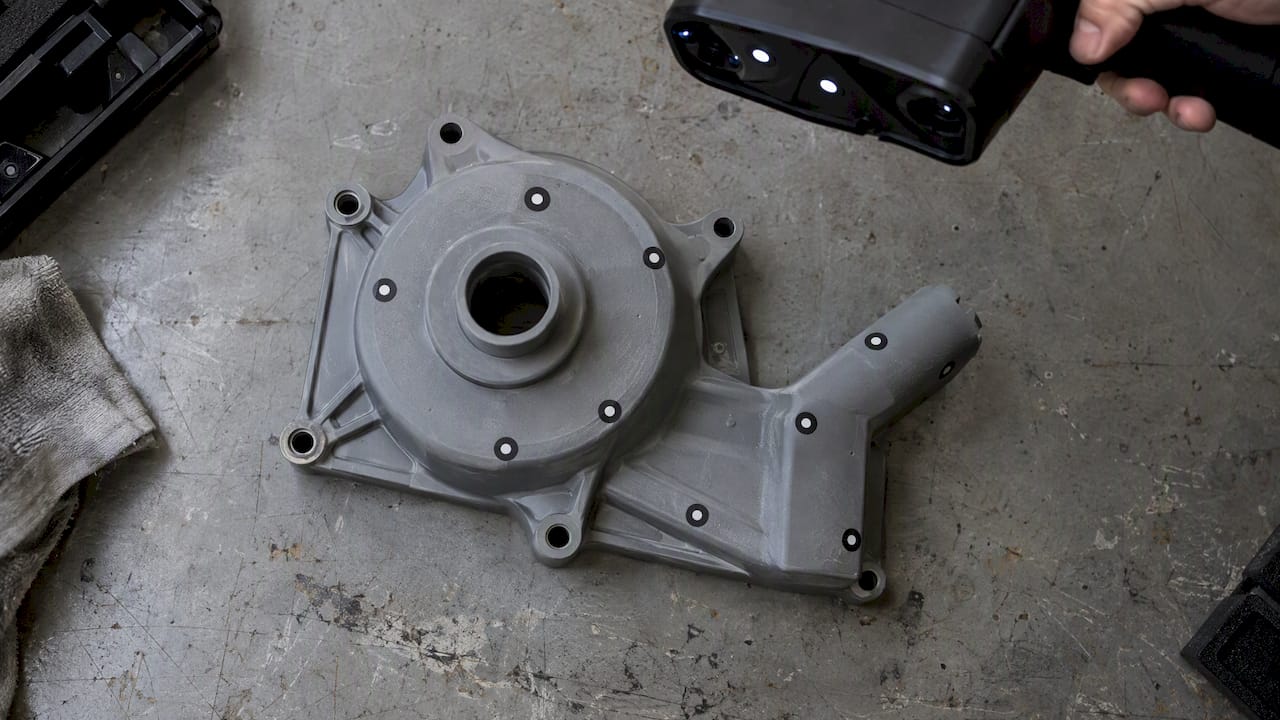
A matte surface solves the capture problem but not the tracking problem. Handheld scanners align frames by recognizing geometry, and a smooth panel or a part with repeating features gives them little to hold on to. Parts with repetitive geometry, such as gears or simple curved panels, can still fail after good prep, and optical positioning markers are often the answer.
Follow the manufacturer’s marker guidance:
- Place markers randomly, not in symmetrical patterns.
- Avoid high-curvature areas.
- Keep at least four markers visible to the scanner at all times.
That guidance comes from one manufacturer’s laser-scanning documentation, so check your own scanner’s manual for its specific requirements. On large automotive parts such as hoods, fenders and body panels, markers are often what separates a clean single scan from several pieces that will not merge.
What this looks like on real automotive and product parts
The parts that reach us most often fall into a few groups:
- Glossy black trim and interior pieces. These need a thin matte layer on the gloss and a decision about whether the finish can take it.
- Chrome and polished metal brackets. Reflection is the main issue, and a vanishing coating on the shiny faces usually matters more than markers.
- Black molded plastic housings. Absorption is the issue. They often scan with light prep, then need markers if the surface is smooth.
- Rubber and dark composite parts. Soft or flexible items need support so they do not deform during the scan, as well as surface prep.
The prep decision is always specific to the part. A scanner working on a gloss black dashboard bezel faces a different problem than one working on a cast-iron bracket with a dull patina.
How scan prep affects the CAD and the print
Surface preparation is only the first step. A scan produces a mesh, and if the job is reverse engineering, someone then turns it into clean CAD. Holes, noise and added coating thickness all carry through into that model.
For reproduction work, the sequence looks like this:
- Prepare the surface and scan, with markers where needed.
- Clean the mesh and check for gaps.
- Rebuild the part in CAD from the scan, so that features like holes, bosses and mounting faces are clean geometry rather than a noisy mesh.
- Print a test part and verify fit against the original.
If you want the background, our guides on scan-to-CAD workflow, scanning for legacy part reproduction and how to optimize scan accuracy cover the later steps. A scanning checklist is useful before you ship a part to any lab, and our piece on which objects suit 3D scanning helps you judge a difficult item up front.
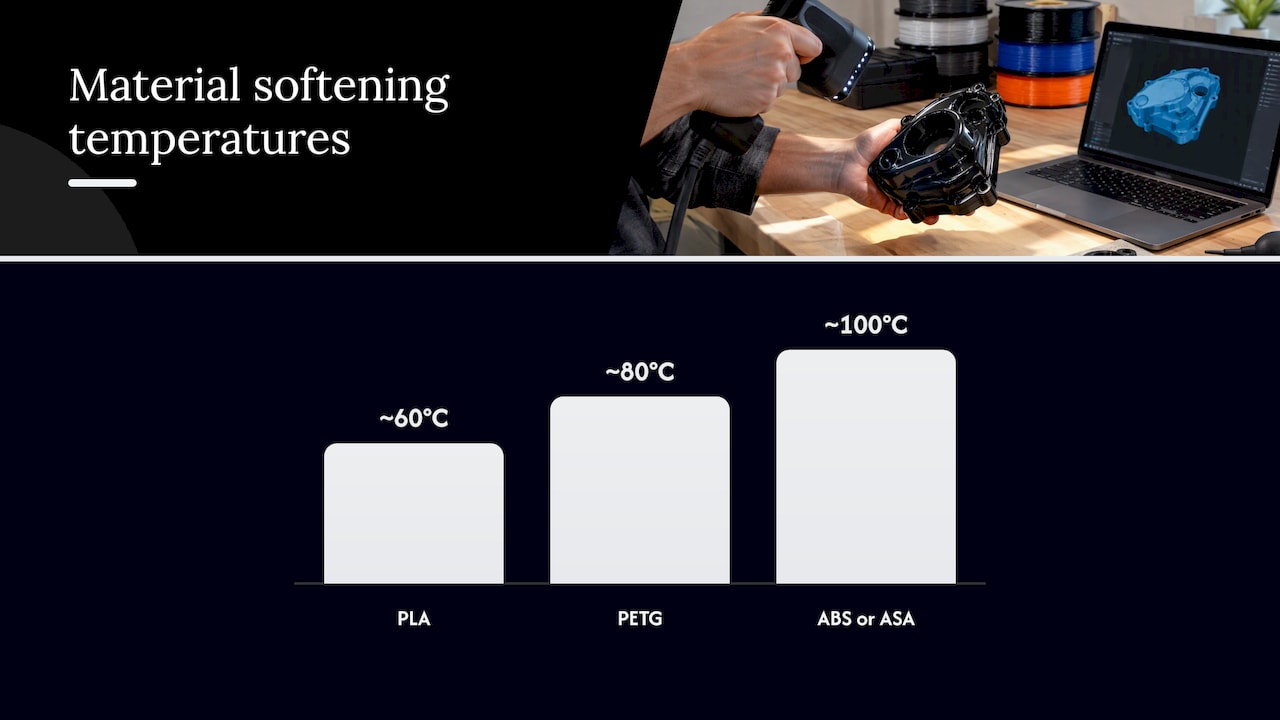
Keep expectations realistic on the print side as well. Our FDM prints typically hold about ±0.2 to 0.5 mm, so a scan that is accurate to about 0.1 mm gives the CAD model more precision than the printed part will carry. Material choice also depends on use: PLA softens around 60°C, PETG around 80°C and ABS or ASA around 100°C, which matters for replacement parts near engine bays or in a hot car interior.
Our perspective on black and shiny parts
We scan these parts regularly, and our view is simple: the prep decision should be made on the part, not on habit. Some shops spray everything, and some refuse to spray anything. Both approaches lose accuracy or time.
Our handheld Einstar workflow gives us professional handheld 3D scanning with accuracy to about 0.1 mm, and that figure is only meaningful if the surface is prepared with care. We start by looking at the part, its finish and what you plan to do with the data. If a glossy panel can be scanned with a change of angle, we do that. If it needs a coating, we use the thinnest one that works and we tell you where it was applied.
The other rule we follow is communication. A customer with a restored car part or a one-of-a-kind component should know before scanning begins whether the finish will be touched. We would rather ask a question about a clear coat than guess. We are owner-operated, so you talk to the person doing the work, and that is how we handle the awkward jobs other shops have declined.
— Justin
Have us scan it
If you would rather not experiment on a part you cannot replace, we can handle the preparation, the scan and, where you need it, the CAD and the print. CC 3D Labs is in the Greater Philadelphia area (Bucks County, PA). Local customers use residential pickup, since we have no walk-in storefront, and finished orders ship anywhere in the United States. We quote each job individually and publish no fixed pricing. See our 3D scanning lab and the full services page for what we do.
FAQ
Can you scan a black shiny part without spray?
Sometimes. Changing the scanner angle, reducing ambient glare and using single-laser or similar settings can capture moderately glossy parts. True gloss black or chrome usually still leaves holes, and a thin matte coating on those areas is the practical fix.
Will scanning spray damage my part?
It depends on the finish and the product. Vanishing sprays and reversible coatings are designed to leave the part intact, but improvised coatings like wax or powder mixes can harm delicate automotive finishes or leave hard cleanup. Test a hidden spot, and tell the scanning lab about any fragile paint or clear coat.
Does the spray change the measurements?
It can. Over-coating adds measurable thickness, which is why professionals use the thinnest layer that works. For tight-tolerance surfaces, tell us so that we can limit or mask the coating there.
Why does my scan fail even after spraying?
The likely cause is tracking, not surface capture. Smooth or repetitive geometry gives the software too little to align on, and positioning markers placed randomly, with at least four visible, usually fix it.
How do I get a quote for scanning a part?
Use our 3D scan quote form and describe the part, its finish and what you need from the data. For printing, use the 3D print quote page, and for reverse-engineered CAD use the CAD quote page.
Sources
- How to Choose 3D Scanning Spray for Accurate 3D Scans
- 3D Scanning Spray: How, When, and Where to Use It Effectively
- Practical 3D Scanning: Troublesome Surfaces & Objects
- Optimising 3D scanning results with Reflecon 3D scanning sprays
- Preparation for Laser Scanning: Metrology Support
- Comparison of Sublimation 3D Scanning Sprays
- 3D scanning of a carburetor body: issues and solutions