
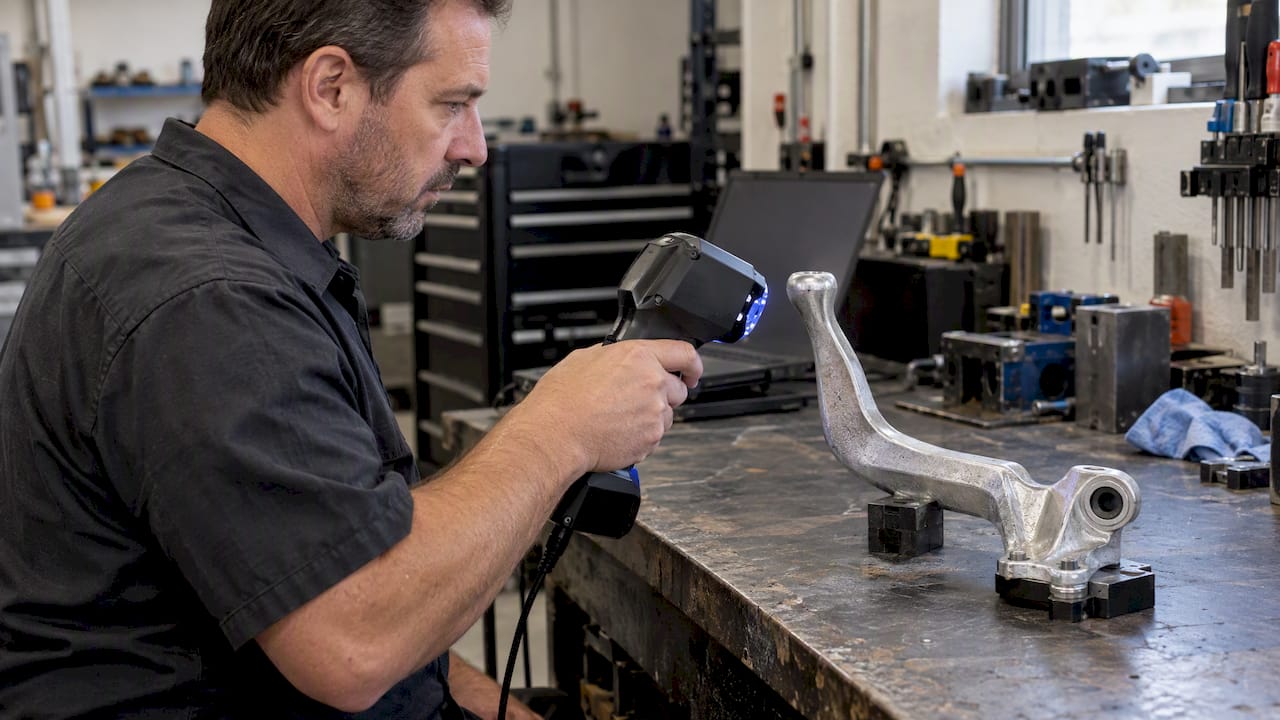
Mesh to CAD conversion means turning a file made of triangles (STL, OBJ, PLY or 3MF) into a boundary-representation model, meaning a solid or surface body made of true planes, cylinders and splines that you can dimension, edit and send to manufacturing. There are two ways to do it. You can wrap the triangles in a solid automatically, which is fast but gives you geometry you can barely edit. Or you can rebuild the part in CAD using the mesh as a reference, which takes longer but gives you a model with real design intent. Which one you need depends on what you plan to do with the part next.
TL;DR
- A mesh stores a surface as thousands of flat triangles. CAD stores it as mathematical features. Converting between them is a choice between speed and editability.
- Automatic conversion (faceted solids, quad-mesh to NURBS) works when the mesh is clean and watertight and you only need to reference or print the shape.
- For prismatic parts such as brackets, housings and adapters, rebuilding with sketches and features from the scan produces the most useful model.
- Scan quality sets the ceiling. A noisy or incomplete scan cannot be rescued by software alone.
- We quote scan-to-CAD jobs individually, so send us the part or the file and we will tell you which route fits.
Table of Contents
- What a mesh is and why CAD software resists it
- Four ways to convert a mesh to CAD
- Preparing the mesh before you convert
- Software workflows, step by step
- Which route fits which part
- Checking the converted model against the scan
- Where conversion goes wrong
- Our perspective
- How CC 3D Labs handles scan-to-CAD work
- FAQ
- Sources
What a mesh is and why CAD software resists it
An STL file describes a surface only as triangles. It carries no information about which triangles form a hole, a fillet or a flat datum face. A CAD model carries exactly that information: a hole is a cylinder with a diameter and an axis, and a fillet is a radius you can change.
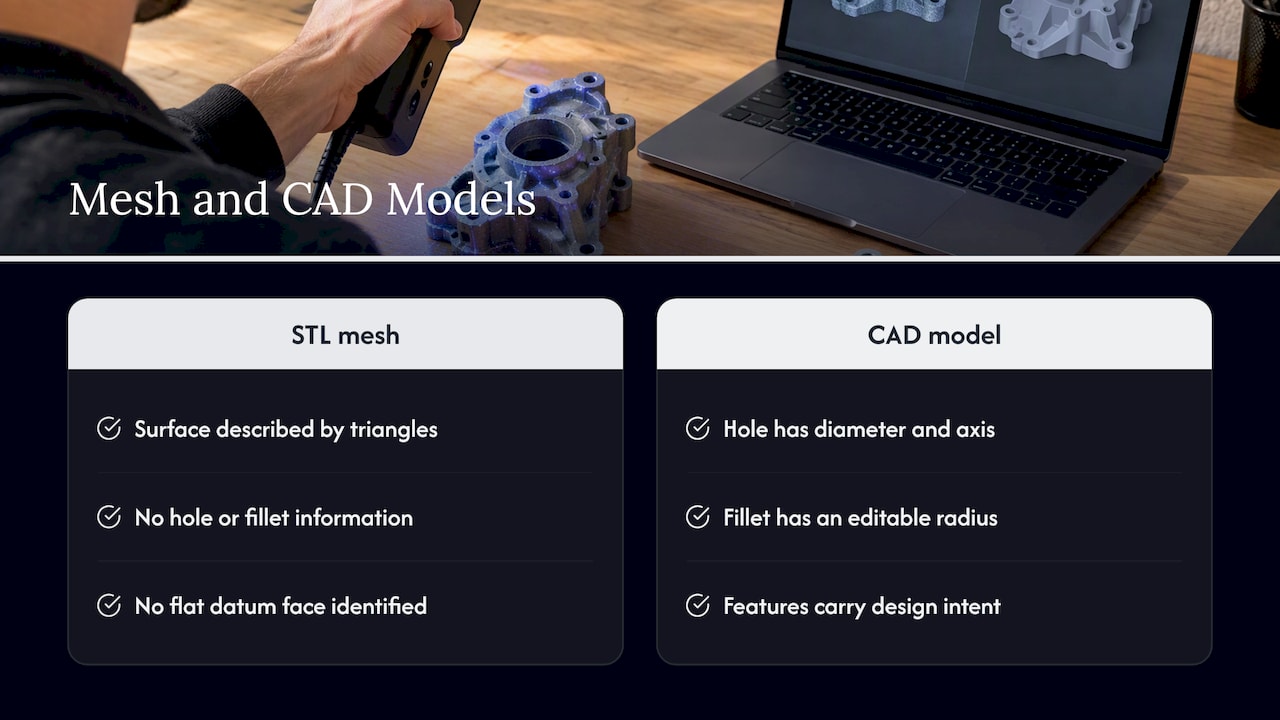
That gap is why “convert STL to CAD” has no single button. Software can wrap triangles into a solid body, but it has to guess the intent behind them, and guesses degrade when the data is noisy. Autodesk’s documentation for Fusion makes the same point: face groups are used to infer prismatic features when converting a mesh, so the software recovers planes and cylinders instead of keeping every triangle as its own face.
Mesh, NURBS and solid: the terms readers mix up
- Mesh: triangles only. Good for printing, visualization and inspection.
- NURBS surface: smooth, mathematically defined patches. Good for organic and freeform shapes such as sculpted housings or body panels.
- Solid (B-rep): a closed volume built from faces that may be planes, cylinders, cones or NURBS. Exports to STEP and is what most engineering workflows expect.
- Parametric model: a solid with a feature history (sketches, extrudes, holes) that you can edit by changing a dimension.
When readers search for “mesh to NURBS,” they usually want the second item. When they search for “STL to CAD,” they usually want the last one, even if they do not know it yet.
Four ways to convert a mesh to CAD
| Method | Best for | What you get | Main limit |
|---|---|---|---|
| Faceted solid conversion | Quick volume for booleans, fit checks, printing | A solid with one face per triangle | Heavy, not editable by dimension |
| Automatic surfacing (quad mesh, surface wizards) | Organic, freeform shapes | NURBS or smooth surface patches | Surfaces rarely align to true datums |
| Feature recognition (prismatic conversion) | Mechanical parts with planes and holes | Merged planar and cylindrical faces | Needs clean data and clear edges |
| Manual rebuild over the mesh (scan-to-CAD) | Parts you will modify, tolerance, or manufacture | Fully parametric solid with design intent | Takes the most engineering time |
1. Faceted solid conversion
If the mesh is closed, most CAD packages can turn it into a solid whose faces mirror the triangles. In AutoCAD, the CONVTOSOLID command does this for watertight meshes, and the SMOOTHMESHCONVERT setting controls whether the result is faceted or smoothed, optimized or not. Autodesk’s desktop help also describes the faceted option as angular, with the same number of faces as the original mesh.
This is the right choice when you need a volume to subtract from another body, check an interference, or build a mating part around an existing object. It is the wrong choice when you need to change a hole diameter.
2. Automatic surfacing
For freeform shapes, software can fit smooth patches across the mesh. SOLIDWORKS describes direct mesh referencing as useful for very complex surfaces, such as consumer products, and offers a Surface Wizard with automatic and guided modes for building surfaces from the scan. After trimming and knitting the surfaces, you can create a solid.
Another route used in practice is retopologizing the mesh to a quad mesh and then converting it to a solid in the CAD package. The surfaces that result follow the shape well, but they are patches fitted to the data, so they do not know where a datum plane or a bolt axis should be.
3. Prismatic feature recognition
In Fusion, the Convert Mesh tool can merge groups of faces into single faces, and the Parametric operation keeps the conversion editable in the Timeline. On a clean scan of a mechanical part, this recovers planar faces and cylindrical bores directly. On a worn or noisy part, it often produces near-planes that are not quite planes, which then fail to mate with anything.
4. Manual rebuild over the mesh
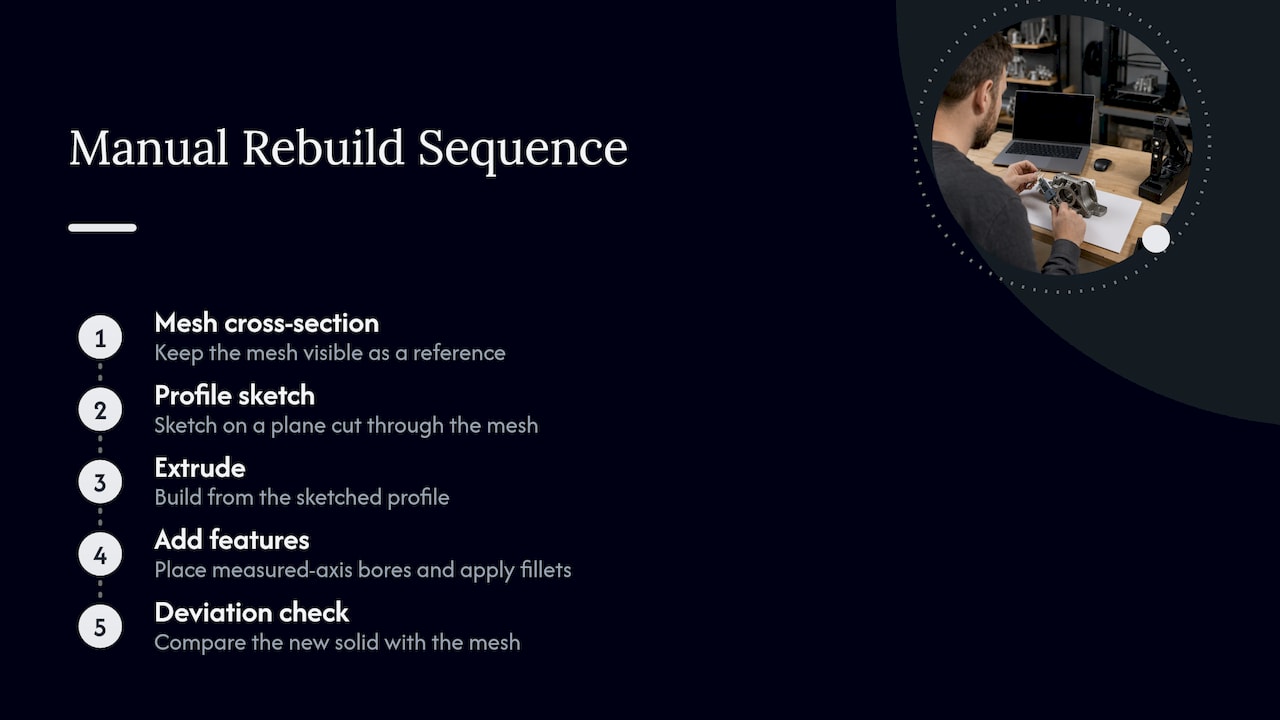
This is the standard approach in professional reverse engineering. The mesh stays visible as a reference, and you build the part from sections: sketch a profile on a plane cut through the mesh, extrude it, add the bores at the measured axes, and apply fillets. You then run a deviation check between the new solid and the mesh to confirm the model matches. Our guide to what scan to CAD involves walks through that sequence.
Preparing the mesh before you convert
Conversion tools fail on bad input far more often than they fail on bad technique. Before any conversion:
- Check that the mesh is watertight. Holes in the mesh stop solid conversion in most tools. FreeCAD users report that whether an STL converts to a solid starts with the validity of the STL.
- Decimate or repair as needed. Dense scan meshes can run to millions of triangles. Reduce them enough for your software to handle, without rounding off small features.
- Fill holes and remove noise. SOLIDWORKS includes a Mesh Prep Wizard that cleans mesh or point cloud files before you create surfaces or a solid.
- Align the mesh to a sensible coordinate system. Orient it on the part’s main datum faces, so every sketch plane you add later is meaningful.
- Confirm scale and units. STL files carry no units. A part that arrives 25.4 times too large or small is a unit mismatch, not a modeling problem.
Pro Tip: Fix the data upstream when you can. A part that was prepared properly before scanning, with matte surfaces and reference targets where needed, produces a cleaner mesh than any repair tool. See our guide to preparing parts for scanning and our note on why scan data integrity matters in manufacturing.
Software workflows, step by step
The three common desktop routes below all rely on the vendors’ documented commands. None replaces judgment about when a result is good enough.
AutoCAD
Use CONVTOSOLID on a watertight mesh, and set SMOOTHMESHCONVERT first. Choose smoothed and optimized if you want merged coplanar faces, or faceted if you need the exact triangle geometry. If the command refuses, the mesh almost certainly has gaps or non-manifold edges.
FreeCAD
The documented path is to import the STL in the Mesh workbench, then use Create shape from mesh in the Part workbench, typically with a tolerance such as 0.05. Run Refine shape, then Convert to solid. Expect a faceted result: the output is a solid made of many small faces, and it will be heavy on large scans.
SOLIDWORKS
The ScanTo3D approach has two documented routes. You can use the Mesh Prep Wizard and then either reference the mesh directly while you model, or build surfaces with the Surface Wizard, trim and knit them, and create a solid. SOLIDWORKS also lists three typical workflows for working with mesh BREP bodies, starting with importing STL, OBJ, PLY or 3MF files from a scanner.
Fusion
From the Design workspace, use the Convert Mesh tool and select faceted or prismatic as the method. Use Parametric if you want to keep the option of editing the conversion later.
Which route fits which part
- A bracket, adapter or housing with flats and bores: rebuild it parametrically. You will want to change dimensions, and every feature has a design reason.
- A discontinued automotive trim piece with compound curves: surface it, or use the mesh as a reference while you build splines over it. A full parametric rebuild would add cost without adding value.
- A fixture or jig built around an existing part: a faceted solid is often enough. You are subtracting the shape, not editing it.
- A part you will print again as-is: you may not need CAD at all. A cleaned mesh prints directly.
- A part going to a vendor that needs STEP: you need a real solid, not a mesh wrapped in a STEP container.
Our article on CAD file formats for 3D printing workflows explains when each format makes sense.
Checking the converted model against the scan
A converted model that looks right can still be wrong by a fraction of a millimeter in the places that matter. Practitioners use deviation analysis to compare the new CAD with the original scan. Comparison tools in this space turn visual judgment into measurable differences, showing where a part departs from nominal geometry.
The same logic applies downstream. Visualization and inspection teams use scan-to-CAD comparison to guide adjustments, and this overview of what to expect from 3D visualization for manufacturers shows how that kind of model feeds into product presentation. For early design checks, AI tools for design for manufacturability can also flag features that will cause trouble in production once you have an editable model.
To go deeper on validating a model before it goes to production, read our piece on validating 3D designs for reliable manufacturing.
Where conversion goes wrong
- Worn parts. A scan captures what the part is today, including wear. If a shaft is worn undersized, a faithful conversion reproduces the wear. Decide whether you are copying the part or restoring its intended dimensions.
- Shiny or dark surfaces. Reflective surfaces create noise and gaps in the mesh. Preparation, covered above, matters most here.
- Hidden features. Internal channels and undercuts that a handheld scanner cannot see have to be measured another way or inferred.
- Over-fitting. A spline that follows every bump of scan noise is not a smooth surface. Fit to the intended shape, not to the data points.
- Printing tolerance. If the converted part will be FDM printed, the process itself has a typical accuracy of about ±0.2 to 0.5 mm, so nominal dimensions need to account for that, especially for mating features.
Our perspective
Most mesh conversion requests we see start with the file, but the better question is what the part has to do. If a customer needs a fixture around an existing component, we do not rebuild the component; a clean mesh body gets the job done. If an automotive restorer needs a replacement part that no longer exists, we scan it with our professional handheld 3D scanner (accuracy to ~0.1 mm), then model the part in CAD so that the dimensions can be edited and the part can be reproduced.
We think the middle path is where people lose money: paying for a full parametric rebuild of a freeform shape, or relying on a faceted solid for a part that will need a revision. The cheapest conversion is the one that matches how the model will be used.
We also prefer to look at the actual part. Every production job we take is quoted after a test print of the real model, and we publish no fixed pricing, because mesh quality and part complexity change the work too much for a rate card to be honest.
— Justin
How CC 3D Labs handles scan-to-CAD work
We are an owner-operated 3D scanning and printing service in the Greater Philadelphia area, based in Bucks County, PA. We scan parts, build the CAD model, and print prototypes or small batches on our Bambu Lab FDM farm in materials such as PLA, PETG, ABS, ASA, PC and carbon-fiber nylon. We can also print mold masters from the finished model. Local customers collect by residential pickup (we have no walk-in storefront), and completed orders ship anywhere in the United States.
If you already have an STL or scan file, request a quote through our 3D modeling and CAD quote form. If you have the physical part, start with the 3D scanning lab. You can see everything we offer on our services page, and examples of past modeling work in the CAD project gallery.
FAQ
Can I convert an STL file to a CAD file automatically?
Yes, for a closed mesh. Tools such as AutoCAD’s CONVTOSOLID, FreeCAD’s shape-from-mesh command and Fusion’s Convert Mesh will produce a solid. The result is usually faceted, with one face per triangle, so it works for fit checks and booleans but not for editing dimensions.
What is the difference between mesh to NURBS and mesh to solid?
A NURBS conversion builds smooth surface patches over the mesh and suits freeform shapes. A solid conversion produces a closed volume, which can be faceted or built from NURBS and analytic faces. Many workflows do both: surface the shape, then knit the surfaces into a solid.
Why does my mesh fail to convert to a solid?
The most common cause is a mesh that is not watertight, meaning it has holes, flipped normals or non-manifold edges. Repair it first, with a mesh-prep tool or a mesh-repair application, and then retry. Our article on scan data integrity covers what causes these defects at the scanning stage.
Can a 3D scan become a fully editable parametric CAD model?
Yes, but it is a rebuild, not a conversion. An engineer uses the scan as a reference and models sketches and features that match it, then verifies the result with a deviation check. We do this as part of our scan-to-CAD service, quoted per project.
How accurate is a CAD model made from a scan?
It depends on the scanner, the surface, the part and the modeling method. Our handheld scanning reaches accuracy to about 0.1 mm, and the final model is checked against the scan data. A part printed on an FDM machine will then carry a typical process tolerance of about ±0.2 to 0.5 mm.
Sources
- AutoCAD: convert a mesh to a 3D solid (Autodesk, 2026)
- To Convert a Mesh Object to a 3D Solid (Autodesk, 2024)
- Convert a mesh body to a solid body (Fusion Help)
- Part MakeSolid (FreeCAD Wiki)
- Making STL into a solid, filled body (FreeCAD Forum)
- Two Methods for Converting Scan Data to a Solid Model (SOLIDWORKS)
- Mesh Prep Wizard (SOLIDWORKS)
- Workflows for Working with Mesh BREP Bodies (SOLIDWORKS)
- CADfix 3D Diff: Compare CAD and Mesh (CAD Interop)