
TL;DR:
- D model verification ensures geometric accuracy, structural integrity, and production readiness before manufacturing begins. It prevents costly downstream errors by detecting hidden issues early through systematic checks and structured milestones.
3D model verification is the proactive process of checking digital models for geometric accuracy, structural integrity, and production readiness before a single part is manufactured. Skip it, and you risk cascading errors: wrong units, broken mesh geometry, and incompatible file formats that surface only after fabrication has started. For product developers and engineers, understanding why 3D model verification is important is not a theoretical exercise. It is the difference between a clean production run and an expensive rework cycle that kills your schedule.
Why 3D model verification is important: the core case
A visually correct CAD model can still contain hidden errors like broken references or faulty geometry that cause manufacturing and documentation failures. That is the central problem with relying on visual inspection alone. What looks right on screen can be fundamentally wrong in the data.
The industry term for this process is CAD validation or 3D model quality assurance, and it covers far more than a visual check. It includes mesh integrity tests, unit consistency checks, topology evaluation, and downstream compatibility verification. Engineers who treat these as optional steps tend to discover their errors at the worst possible time: after tooling has been cut or parts have been printed.
Spatial and geometric tests are risk management steps that prevent downstream pipeline failures. Failing to run them early means discarding hours of subsequent texturing, rigging, or manufacturing prep work. The cost is not just time. It is the compounding effect of every downstream step built on a flawed foundation.
Structured, multi-stage review milestones such as 30%, 60%, and 90% audits are professional standards in 2026 to catch errors early and prevent cascading issues. These checkpoints are not bureaucratic overhead. They are the mechanism that keeps small geometry problems from becoming full production failures.
What are the key components of effective 3D model verification?
Effective verification checks several distinct layers of a model, and each layer catches a different class of error.
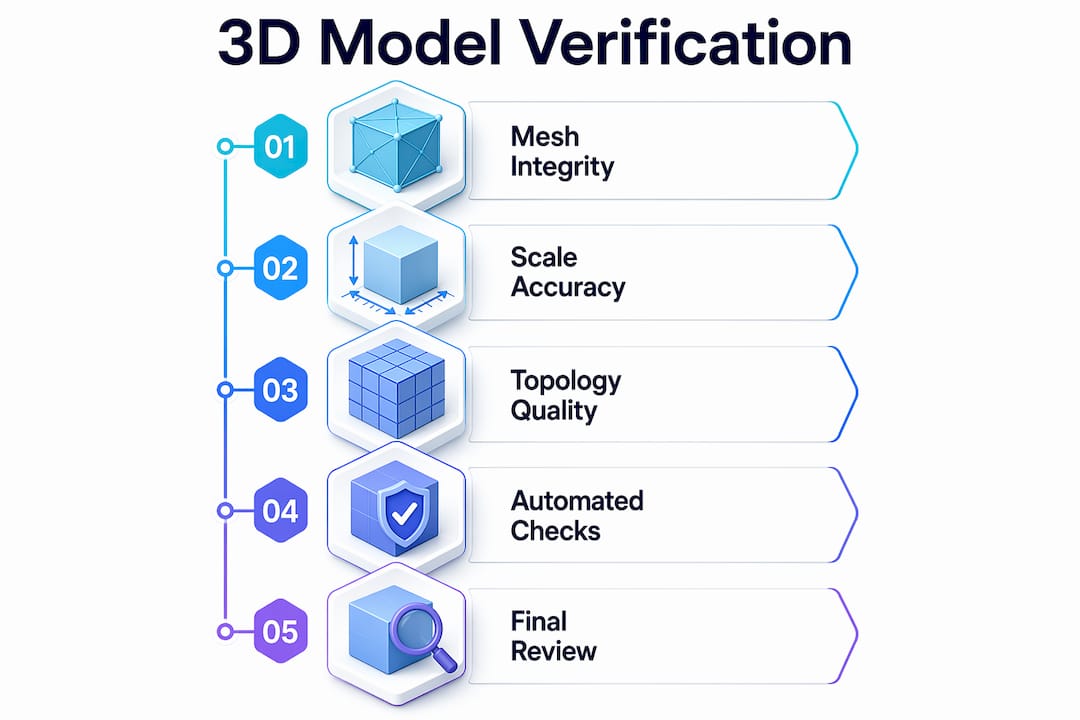
Mesh integrity is the first line of defense. Common faults include reversed normals, non-manifold edges, and open shells. A non-manifold edge, for example, is one shared by more than two faces. Slicers and manufacturing software cannot process these correctly, which means a model that looks solid will fail at the fabrication stage.
Scale accuracy and unit consistency are equally critical. A model built in millimeters but exported as inches will produce a part that is 25.4 times the intended size. This error is trivially easy to make and surprisingly common when files move between different CAD environments or teams.
Topology quality determines how a model behaves in downstream workflows. Good topology supports deformation, subdivision, and efficient rendering essential for production use. For functional parts, poor topology can cause stress concentration points that only appear under load testing.
| Verification criterion | Common fault | Impact on production |
|---|---|---|
| Mesh integrity | Non-manifold edges, open shells | Slicer failure, fabrication rejection |
| Scale and units | Unit mismatch between environments | Incorrect part dimensions |
| Topology quality | Irregular polygon flow, T-junctions | Deformation errors, rendering artifacts |
| UV and texture mapping | UV overlap, incorrect color space | Visual defects in rendered or printed parts |
| Watertightness | Holes in mesh surface | Failed 3D print, unusable geometry |
The table above shows why no single check is sufficient. Each criterion targets a different failure mode.
Pro Tip: Run a slicer pass as a final mesh integrity check before submitting any model for fabrication. A clean slicer pass rate is one of the strongest predictors of a successful print.
Automated quality assurance catches 95% of common mesh and texture flaws, freeing engineers to focus manual effort on nuanced topology and functional assessments. That 5% gap is where expert human review earns its value.
How does 3D model verification prevent costly downstream errors?
The timing of error discovery is everything in product development. An error caught at the 30% design milestone costs a fraction of what the same error costs after manufacturing has begun. This is not an opinion. It is a structural feature of how production pipelines work: every downstream step adds cost and time to any upstream mistake.
CAD validation reduces rework and supports compliance by confirming models meet dimensional and functional requirements before production. Validated models also improve coordination between design, manufacturing, suppliers, and stakeholders. That coordination benefit alone justifies the time investment.
The most common costly errors that verification prevents include:
- Incorrect units or scale causing parts to be fabricated at the wrong size, requiring full reprints or remachining.
- Non-manifold geometry causing slicer failures that halt production until the model is repaired.
- Missing or broken references in assembly files that cause incorrect bill-of-materials outputs and procurement errors.
- Incompatible geometry between mating parts that only surfaces during physical assembly, requiring redesign.
- Wrong color spaces or UV errors in models destined for multi-color or textured printing, causing visual defects in finished parts.
Each of these errors is detectable before fabrication with a structured verification workflow. Each becomes significantly more expensive after fabrication has started.
A CAD model’s readiness is defined by downstream compatibility. If later pipeline steps require manual repair, the model fails validation regardless of how good it looks. Avoiding the “polish later” mindset is the single most effective habit engineers can build.
Pro Tip: Treat the 30% review milestone as your geometry checkpoint. Confirm mesh integrity, units, and scale before investing time in detailed features or surface finishing.
For engineers using part validation in 3D printing, catching errors at the design stage eliminates the most common causes of print failure and part rejection.
What tools and workflows make verification more effective?
Automated verification tools handle the high-volume, rule-based checks that would take hours to run manually. Automated scripts efficiently filter fundamentally broken models, saving manual inspection time for advanced subjective assessment like topology flow. This hybrid approach is the current best practice for production-ready asset pipelines.
A tool-agnostic mindset centered on core 3D spatial principles is more valuable than relying on any single software validator. Models must survive across multiple pipelines, and a check that passes in one environment may fail in another if the underlying geometry is marginal.
Recommended verification techniques for engineers:
- Automated mesh analysis: Checks for non-manifold edges, reversed normals, open shells, and degenerate faces. Most slicer software includes basic versions of these checks.
- Bounding box validation: Confirms the model occupies the correct volume and that scale has not been corrupted during export.
- UV and color space checks: Verifies UV utilization thresholds and correct color spaces (sRGB for display, Linear for rendering) to prevent texture errors.
- Watertightness testing: Confirms the mesh is a closed solid with no holes, which is a hard requirement for most 3D printing workflows.
- Topology review: Manual or semi-automated assessment of polygon flow, edge loops, and face count relative to the model’s intended use.
Validation is the indispensable gatekeeper that converts generative AI models into reliable, shippable assets by enforcing deterministic outputs and quality criteria. As generative modeling tools become more common in product development, this gatekeeper role becomes more critical, not less.
Pro Tip: Never defer spatial validation to the end of your workflow. Run geometry and scale checks immediately after the initial model is built, before any texturing or assembly work begins.
For a structured approach to validating 3D designs within manufacturing workflows, building these checks into your standard operating procedure is the fastest way to reduce defect rates.
How should product developers integrate verification into their process?
Verification works best when it is built into the project timeline from the start, not added as a final gate before production. The 3D modeling process for businesses should include defined verification checkpoints at each major milestone.
| Project phase | Verification activities | Goal |
|---|---|---|
| Concept (30%) | Geometry check, unit confirmation, scale validation | Confirm foundational model integrity |
| Development (60%) | Topology review, assembly fit check, reference validation | Catch functional and compatibility errors |
| Pre-production (90%) | Full mesh audit, slicer pass, UV and texture check | Confirm production readiness |
| Final release | File format validation, documentation check | Ensure handoff package is complete |
Cross-functional coordination between design, manufacturing, and quality teams is what makes this schedule work. Each team brings a different perspective on what “correct” means for a model. Design teams check intent. Manufacturing teams check producibility. Quality teams check compliance. All three views are needed.
Defining verification criteria early, before modeling begins, prevents the most common source of late-stage conflict: disagreement about what the model was supposed to achieve. A shared checklist, agreed upon at project kickoff, gives every team a common standard to work toward.
Drafting standards in 3D modeling provide the structured review checkpoints that keep multi-team projects aligned and reduce handoff errors between design and production.
Pro Tip: Embed verification criteria into your project brief at kickoff. When every team knows the acceptance standards from day one, late-stage surprises drop dramatically.
Verification is not a formality. It is the work.
I have reviewed hundreds of models that looked production-ready on screen and failed within the first automated check. The pattern is consistent: teams that treat verification as a final approval step always find their worst errors at the worst time. Teams that build it into every milestone find the same errors when they are still cheap to fix.
The most underestimated risk in product development is not a bad design. It is a good design with a bad model. A brilliant concept built on non-manifold geometry or mismatched units will fail in fabrication just as reliably as a poor design. The geometry does not care how good the idea is.
Generative AI tools are making this problem more acute, not less. AI-generated models can look convincing while containing structural errors that no human would introduce manually. Machine-verifiable tests for topology, watertightness, and schema conformance are now essential for any team using generative modeling in their pipeline. The speed of AI generation means errors can propagate faster than ever before.
My strongest recommendation is this: build a verification culture, not just a verification step. When every engineer on your team treats geometry integrity as their personal responsibility, not the QA team’s problem, error rates drop and project timelines stabilize. Verification is not overhead. It is the work.
— Justin
Cc3dlabs supports precision from model to finished part
Cc3dlabs works with product developers and engineers near Philadelphia and ships nationally, providing professional 3D printing services built around verified, high-accuracy models. Every project starts with a model review to confirm the file is production-ready before printing begins.

Validated CAD files and metrology-grade 3D scan data feed directly into Cc3dlabs’ filament-based printing workflow, producing prototypes and functional parts that match design intent. Whether you need a single prototype or a batch production run, Cc3dlabs offers free online estimates, design support, and fast turnaround. Submit your model for a free estimate and get a clear picture of what your verified design will cost to produce.
FAQ
What is 3D model verification?
3D model verification is the process of checking a digital model for geometric accuracy, unit consistency, mesh integrity, and downstream compatibility before fabrication. It is also called CAD validation or 3D model quality assurance.
Why do visually correct models still fail in production?
A model can appear correct on screen while containing hidden errors like non-manifold edges, broken references, or wrong units. These errors only surface when the model enters a slicer, manufacturing software, or assembly workflow.
When should verification happen in a project?
Verification should happen at the 30%, 60%, and 90% milestones of a project, not only at the end. Early checks catch foundational errors before downstream work amplifies their cost.
How does automated verification differ from manual review?
Automated verification catches up to 95% of common mesh and texture flaws through rule-based checks. Manual review handles nuanced assessments like topology flow and functional fit that require expert judgment.
What is the biggest risk of skipping 3D model verification?
The biggest risk is discovering errors after fabrication has started, when the cost to correct them is highest. Unverified models frequently cause slicer failures, incorrect part dimensions, and assembly incompatibilities that require full redesign.
Key takeaways
3D model verification is the most cost-effective risk management step in product development, and errors caught before fabrication cost a fraction of what they cost after production begins.
| Point | Details |
|---|---|
| Verify early and often | Run geometry and scale checks at the 30%, 60%, and 90% project milestones. |
| Automate first, then review | Automated tools catch 95% of common flaws; use manual review for topology and functional fit. |
| Visual inspection is not enough | Hidden errors like non-manifold edges and wrong units require systematic checks to detect. |
| Define criteria at kickoff | Agree on acceptance standards before modeling begins to prevent late-stage team conflicts. |
| Verification enables AI workflows | Machine-verifiable tests are now required to make generative AI models production-ready. |